Variables
Introduction
Depending on your Scratch program, you may find that your code requires data to be stored. This data could be the player's remaining lives, the number of times a sprite was clicked, or even the location of your mouse.
What are variables?
Variables are essentially containers that are able to store values. Kussmaul et al. (2020) state that "many programming languages use variables to store information". (p. 42) The term 'variables' may be familiar, as they have been used in algebra to represent numeric values that can be changed. (Kumar & Kumar, 2023) Unlike math, these values are not limited to integers and can include:
- Strings, aka Text (What Is a String?, n.d.)
- Booleans, such as true or false (Mr Matthews, 2019)
(Kussmaul et al. 2020, Mr Matthews, 2019)
Like in algebra, the value of variables can be changed by outside conditions such as our code. Just note that variables may only store one value each at any given time.
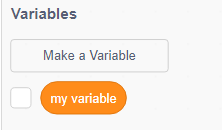
In Scratch, variables can be found under the 'Variables' section in the block palette. By default, every Scratch project will have a variable named "my variable". To create a new variable, click 'Make a Variable', which is located over the list of variables currently in the project. (Kussmaul et al. 2020)
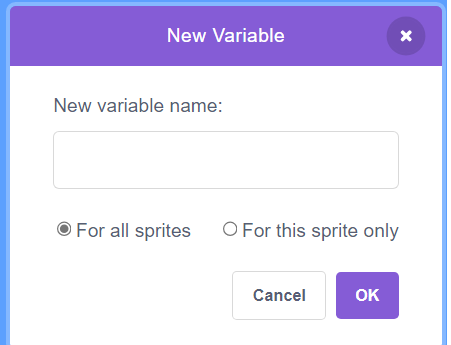
You should see this menu upon clicking 'Make a Variable'. Here, you can name your new variable and specify which sprites are able to access it. Make sure that the variable's name is specific enough to ensure that it is easy to understand. (Kussmaul et al. 2020) By default, the variable can be accessed by all sprites, but it can be set so that only the currently selected sprite may access it. If a backdrop is currently selected, it will default to all sprites.
Variable Blocks
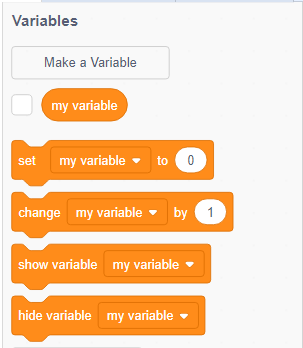
Note: When this page mentions 'X', assume that it is replacing a part of a block that can be changed and 'V' when standing in for a variable's name. There are various blocks that can affect variables, such as 'set X to X' and 'change X by X'.
Set V to X
This block sets the variables value to the specified value. (Kussmaul et al., 2020) It's useful for resetting a variable's value as it will always change the value to whatever's specified in the block. For example, the block 'set text to hello' would change the value of the variable 'text' to hello'.
Change V by X
While this block also changes a variable's value, it can only change it by a predetermined amount. It only works with integers. Attempting to use other values will have it simply treat it as 0. For example, 'change score by 10' would add 10 to 'score' everytime that block runs.
Show and Hide variable V
These two blocks toggle the visibility of the variable. This means that if the variable is visible, you will be able to see it in the top-left corner of the stage. Like this:
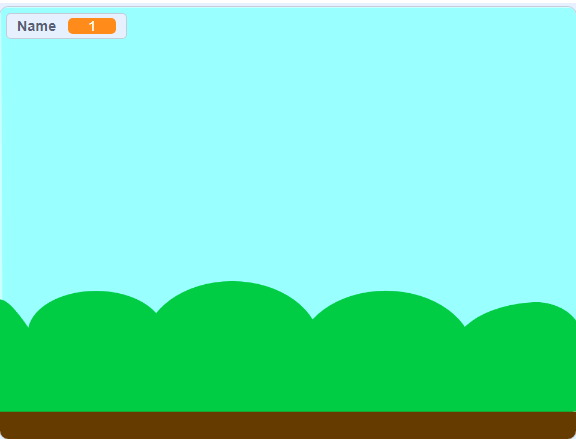
Use 'Hide variable V' if you don't want the variable to be visible.
Summary
- Variables are containers that contain information.
- This information can be integers, strings, or booleans.
- Scratch contains blocks that are able to affect variables. These include:
- Set V to X
- Change V by X
- Show variable V
- and Hide variable V
To learn more about variables, try watching this video made by Mr Matthews on Youtbe.